BULKBRAINS / HEATMAP
See player movement as 3D space.
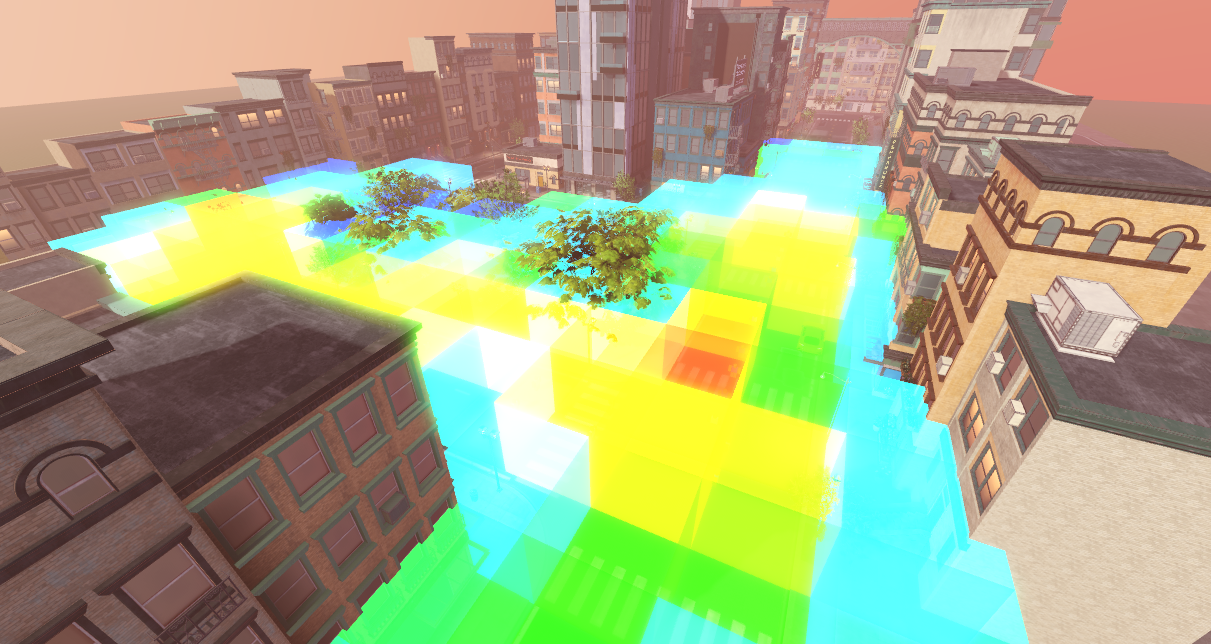
Heatmap turns live Roblox player movement into cube-based 3D visualisations inside Studio, preserving floors, height, ramps, drops and vertical routes that a flat image cannot show.
01 / WHAT IT DOES
A heatmap built for worlds, not webpages.
Roblox maps are volumetric. Players move above, below and through one another. Heatmap keeps that spatial structure intact so you can inspect behaviour against the actual level geometry.
True 3D output
Every occupied region becomes a cube positioned within the same X, Y and Z space as your map.
Readable density
Cube colour and intensity make dominant routes, congestion and dead areas immediately visible.
Built for Studio
Generate and inspect the result where you build, rather than trying to compare it with a separate dashboard.
Configurable resolution
Use larger cells for broad movement patterns or smaller cells for detailed interaction zones.
02 / THE PIPELINE
From movement data to inspectable geometry.
The product does more than place colourful parts. It captures, partitions, aggregates and reconstructs spatial data so a large volume of player movement becomes useful inside Roblox Studio.
Capture
Sample player positions from live sessions at a controlled interval.
Partition
Map each coordinate into a configurable three-dimensional cell.
Aggregate
Reduce repeated samples into compact density values for each occupied cell.
Generate
Rebuild the dataset as coloured 3D cubes over the original Roblox map.
Flat heatmaps show a surface. Heatmap shows the space your players actually occupied.
03 / FREE PREVIEW
Test it on a real Roblox experience.
Heatmap is currently available as a free preview. Capture real movement data, generate a 3D heatmap and help shape the product before paid plans are introduced.